How to Build an Email List for a Solo Business Without Paid Ads
A practical path to your first email subscribers: one lead magnet, one signup page, a welcome email, and one channel — no ad budget required.
Social followers disappear when an algorithm changes. An email address, given with permission, is yours to talk to until the person unsubscribes. For a solo business with almost no marketing budget, that is the difference between starting from zero every month and compounding attention you already earned.
This is not a guide to “growth hacks.” It is the smallest complete loop: something useful for free, a page that collects addresses, a welcome message that delivers it, and one place you already show up to send people there.
Why a list matters when you are on your own
You do not need tens of thousands of subscribers to make email useful. You need the right people — readers who care about the problem your business solves.
Email does three jobs a solo operator actually needs:
- Reach without paying again. Every post, comment, or conversation can end with “join the list for the checklist.” You are not buying impressions; you are converting attention you already have.
- Trust before a sale. Most buyers need more than one touch. A short sequence of helpful messages beats a single sales pitch on a cold page.
- A home you control. Platforms change rules, throttle reach, or shut down accounts. A list plus a site you own is the portable part of the business.
If you have not yet defined what you sell, start with turning a skill into an offer before you optimize signup copy. A list built around a vague “newsletter” fills slowly and converts poorly.
The four pieces (and what to skip for now)
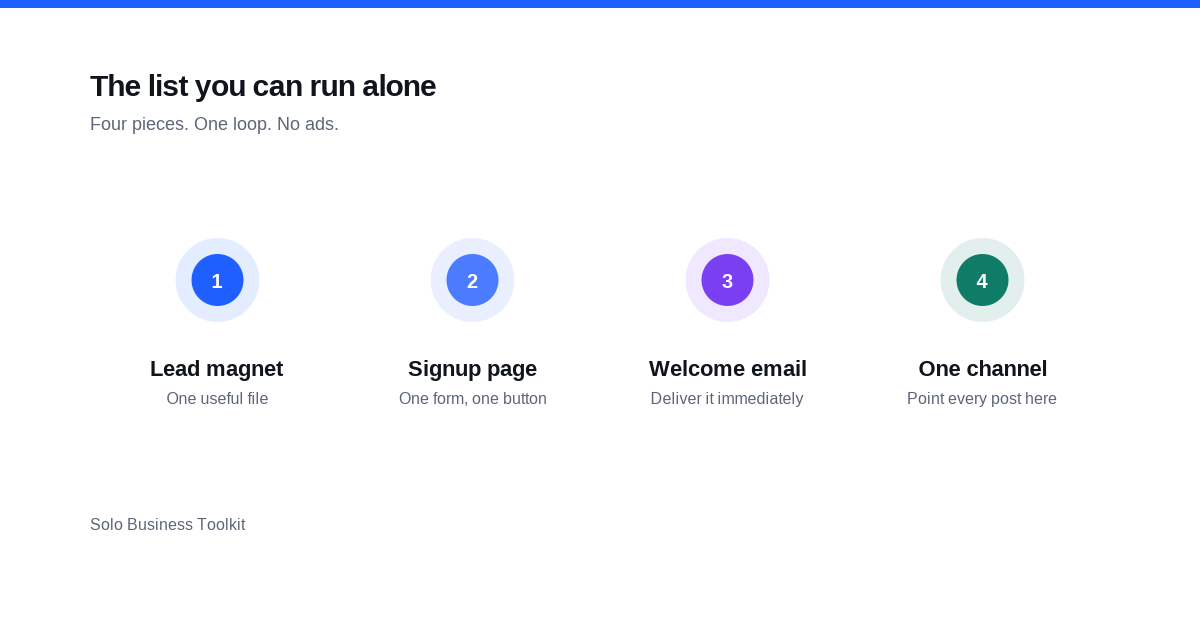
You need exactly four things working together:
| Piece | Job |
|---|---|
| Lead magnet | A free, finished resource that solves one small problem |
| Landing page | One page with one goal: email in exchange for the magnet |
| Signup form | Usually email only; name is optional |
| Welcome email | Delivers the magnet immediately and sets expectations |
Skip for your first version: tripwire products, complex automations, pop-ups on every page, segmented funnels, and paid ads. Add those only after people are subscribing and opening mail without you chasing them.
Step 1 — Pick a lead magnet people will actually use
A lead magnet is not “sign up for updates.” It is a specific file or lesson someone can use in one sitting.
Strong magnets for solo businesses:
- A checklist (launch steps, pricing review, client onboarding)
- A template (proposal, scope doc, content calendar)
- A short guide (three to seven pages on one narrow topic)
- A email mini-course (three to five lessons on a single skill)
The magnet should point toward what you sell later. If you help freelancers price projects, a “rate review worksheet” fits. If you sell a digital guide about client acquisition, the first chapter or a one-page summary fits.
Weak magnets: 40-page ebooks nobody finishes, generic “tips” PDFs, or anything unrelated to your paid offer.
Test before you design. Describe the magnet in one sentence to someone outside your field. If they ask follow-up questions, you are close. If they nod politely, narrow the topic.
Step 2 — Build a landing page with one action
The landing page (opt-in page) should do one thing: explain what the visitor gets and collect their email.
Include:
- A headline that names the outcome (“A one-page freelance proposal template”)
- Two or three bullets on what is inside
- A preview image or mockup if the magnet is visual
- A form with one field (email) unless you will personally use their first name
- A button that says what happens (“Send me the checklist”)
Remove main navigation, unrelated links, and long bios. One page, one button.
Thank-you page: confirm signup, tell them to check inbox (and spam folder once), and optionally point to your best public article. Do not hard-sell a paid product on the thank-you page on day one.
Step 3 — Wire the signup form correctly
Whether the form lives on a dedicated page or at the bottom of a blog post, check these before you promote it:
- Submitting the form adds the contact to the list you intend to use.
- The welcome email sends automatically within a minute.
- The download link works on mobile.
- You receive a test signup using a fresh address (Gmail and Outlook if possible).
Double opt-in (confirm via email before delivery) can improve list quality in some markets; it also reduces signups. Pick one approach and stay consistent. If you mail U.S. subscribers commercial messages, follow the FTC’s CAN-SPAM basics: honest subject lines, a physical address in the footer, and a working unsubscribe link.
Step 4 — Write the welcome email
The welcome email is the highest-attention message you will send. Keep it short.
Structure:
- Deliver the magnet in the first two sentences (link or attachment).
- Say what happens next (“Every Tuesday I send one practical note on pricing and proposals.”).
- One small ask — reply with their biggest question, or click one helpful post.
Subject line examples: “Your proposal template is here” or “Here’s the checklist you asked for.” Avoid clever puns on email one; clarity wins.
After the welcome, a three- to five-email sequence over one to two weeks is enough: one extra tip, one common mistake, one story or example (real, not invented), then a soft mention of your paid offer or booking link. You do not need a twenty-email launch machine before you have subscribers.
A simple weekly workflow (about 90 minutes)
Once the loop works, maintain it on a repeating schedule:
| When | Task |
|---|---|
| Weekly | Publish once on your chosen channel (see below). End with the same signup link. |
| Weekly | Send one email to the full list — one idea, one example, one link. |
| Monthly | Review signup count, welcome open rate, and replies. Fix broken links before you add tactics. |
| Quarterly | Refresh the magnet if the offer changed; do not rename it every week. |
That rhythm fits alongside the weekly planning habit in a weekly operating system for a one-person business.
Choose one channel to feed the list
Paid ads are optional because traffic can come from work you already do. Pick one channel and point every piece to the same signup page, as described in marketing on a budget: pick one channel and own it.
Examples:
- Blog or SEO articles — end with the magnet, not “follow me everywhere.”
- LinkedIn or short-form video — one CTA in the bio or pinned comment.
- Communities — share the free resource when it genuinely answers a question (not drive-by links).
The channel brings strangers; the list keeps the relationship.
Common mistakes
- No magnet, just “subscribe.” Updates alone rarely convert cold visitors.
- Magnet too broad. “Business growth tips” attracts everyone and sells to no one.
- Form asks for too much. Every extra field costs signups.
- Welcome email buried. If the link is in paragraph four, people assume it failed.
- Never mailing after signup. Subscribers forget why they joined; unsubscribes spike.
- Buying ads before the loop works. Ads amplify a broken page; they do not fix copy.
Choosing an email tool (without overpaying)
You need: a form, a list, automated welcome delivery, and plain broadcasts. Nice-to-haves later: tags, visual automations, checkout on the same account.
Compare limits you will hit first — subscribers, monthly sends, number of automations — not feature laundry lists. MailerLite’s public pricing, for example, describes a free tier with a subscriber cap and monthly send cap; Kit’s pricing page describes a free newsletter tier with a subscriber limit and unlimited sends on paid plans. Gumroad is built around product checkout, not list building, though you can collect emails around downloads.
When you want one signup page, email automation, and a checkout link without stitching three products together, systeme.io is one third-party option this site links to. It is not a download from Solo Business Toolkit; verify current plan limits on the vendor’s site before you rely on them.
If you are also building a paid digital product, read build a digital product that sells so the magnet and the product solve the same problem.
The short version
Pick one narrow lead magnet tied to your offer. Put it behind a single landing page with a short form. Send a welcome email that delivers the file immediately. Drive signups from one channel you can sustain. Mail your list weekly. Fix the loop before you pay for ads or add funnel complexity.
A page for the offer
systeme.io is a third-party platform for a sales page, email and checkout, with a free account. This button leaves this site. We may earn a commission if you sign up, and we have not verified every feature.
Open systeme.ioAffiliate link — we may earn a commission at no extra cost to you.
Keep reading
Marketing on a budget: pick one channel and own it
Most solo businesses do not fail at marketing because they lack tactics. They fail because they spread a small budget across five channels.
Read article →
Systeme.io Review: Features, Pricing, Pros & Cons (2026)
Systeme.io bundles funnels, email, pages, courses, and checkout. This review sticks to public plan limits and trade-offs — not hype.
Read article →
A weekly operating system for a one-person business
The goal is not to work more hours. It is to stop deciding what to do every morning, so the business runs on a rhythm instead of on panic.
Read article →